> ## Documentation Index
> Fetch the complete documentation index at: https://docs.scrapegraphai.com/llms.txt
> Use this file to discover all available pages before exploring further.
# Make
> Use ScrapeGraphAI inside Make.com scenarios to scrape, extract, search, crawl, and monitor web pages
## Overview
The ScrapeGraphAI app for Make.com lets you connect any automation scenario to ScrapeGraph's v2 API — no code required. Fetch pages, extract structured data with an AI prompt, run web searches, kick off multi-page crawls, and schedule monitors, all as native Make modules.
Install the app from Make's marketplace
Get your API key
## Installation
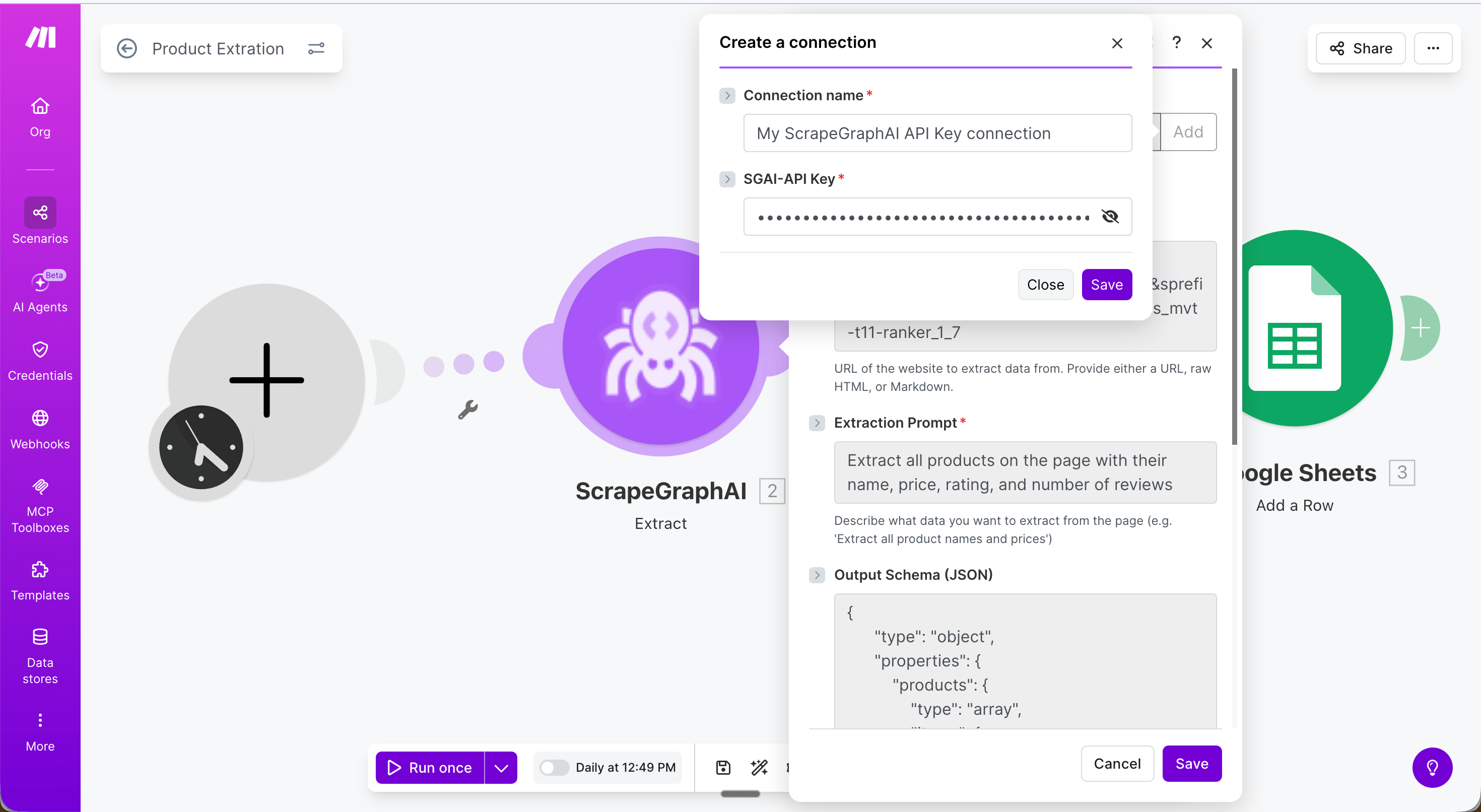
1. Open your Make.com workspace and go to **Connections**.
2. Search for **ScrapeGraphAI** and click **Install**.
3. When prompted, enter your `SGAI-APIKEY` from the [dashboard](https://scrapegraphai.com/dashboard).
4. Click **Save** — the connection is shared across all modules in your scenario.
 ## Example: Extract product data into Google Sheets
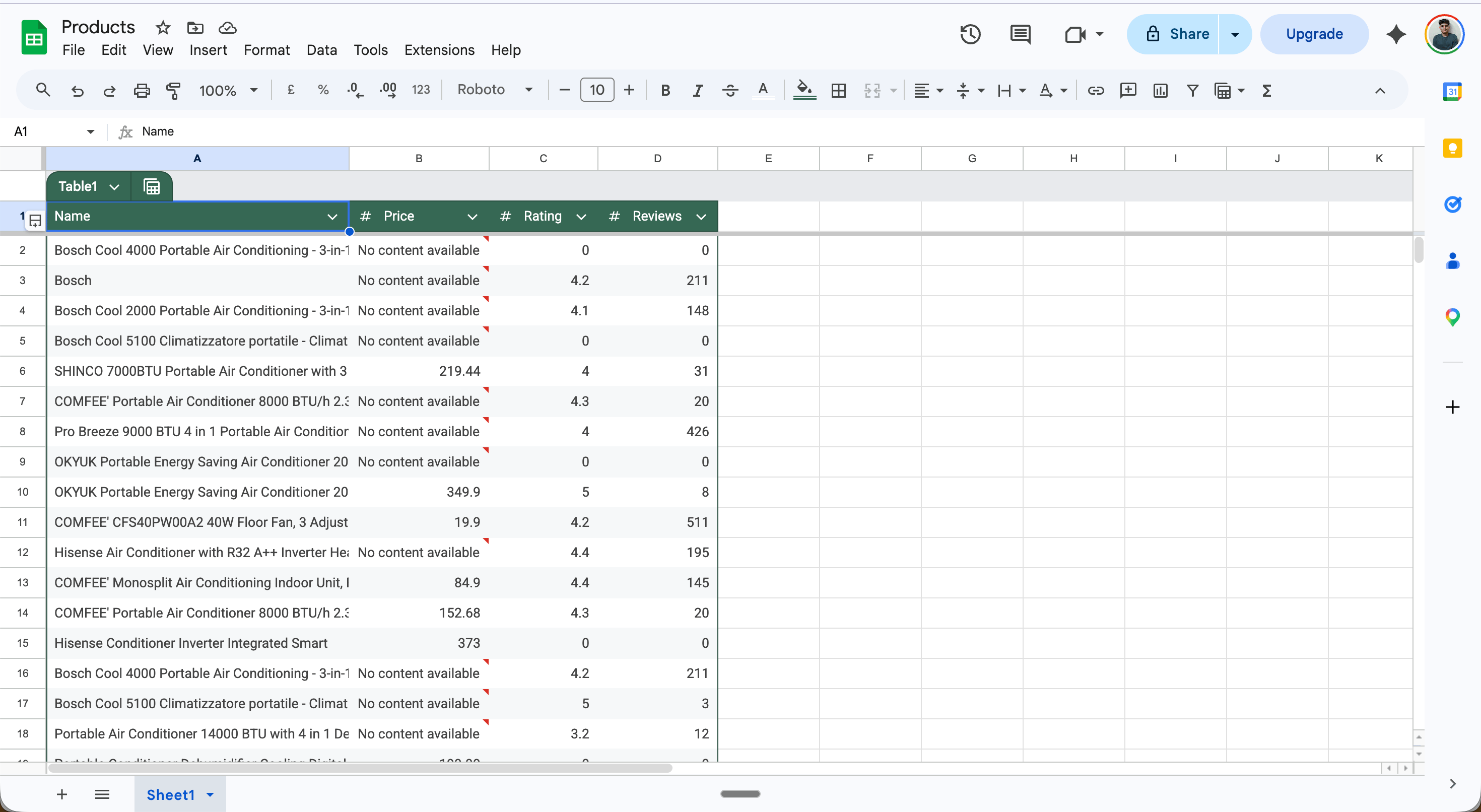
This scenario runs daily, extracts all products from an Amazon search page, and saves each one as a row in Google Sheets — no code required.
**Full scenario flow:**
## Example: Extract product data into Google Sheets
This scenario runs daily, extracts all products from an Amazon search page, and saves each one as a row in Google Sheets — no code required.
**Full scenario flow:**
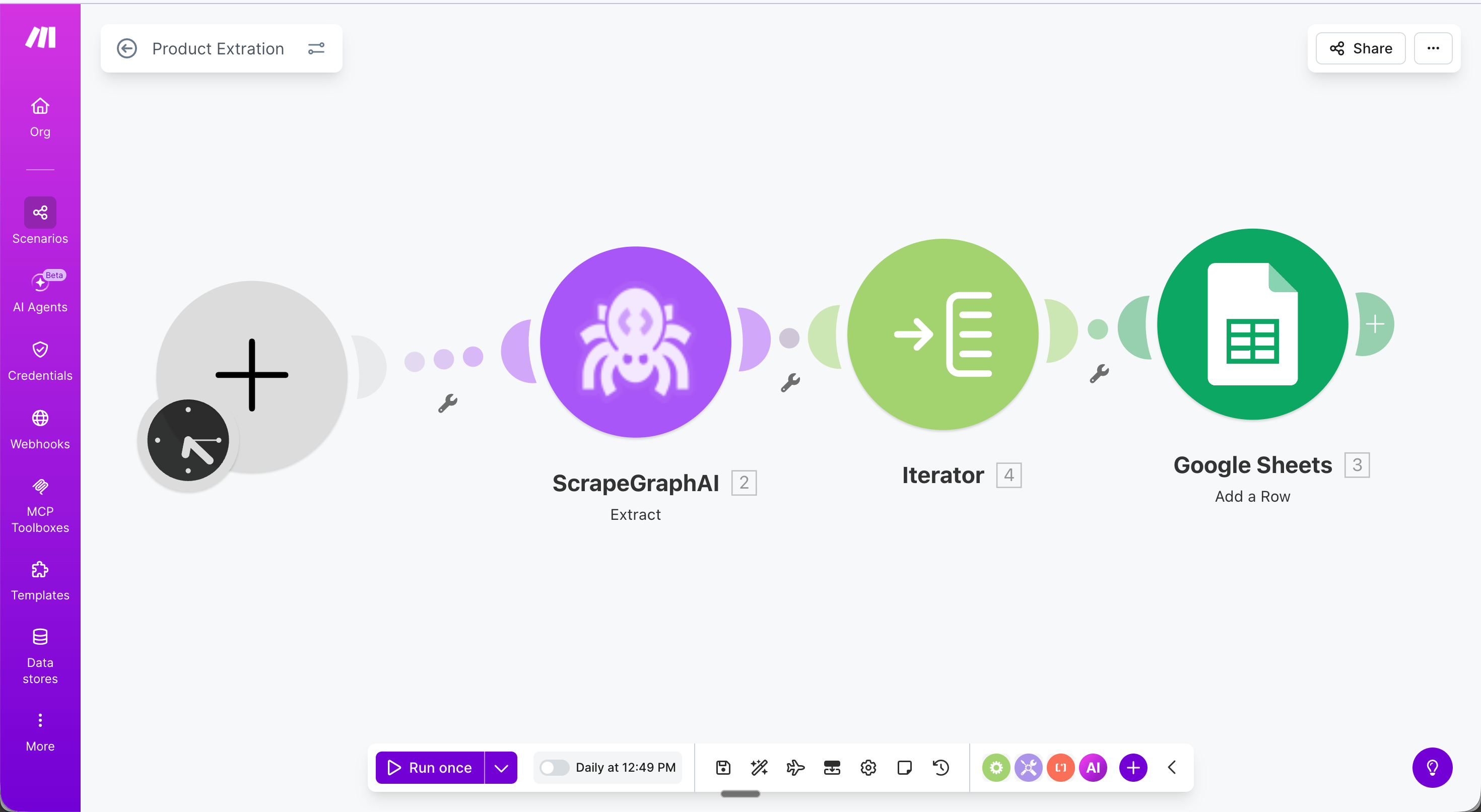 **Step 1 — Schedule trigger**: Set the scenario to run daily (or any interval).
**Step 2 — Extract module**: Configure with your target URL, an extraction prompt, and an output schema.
**Step 1 — Schedule trigger**: Set the scenario to run daily (or any interval).
**Step 2 — Extract module**: Configure with your target URL, an extraction prompt, and an output schema.
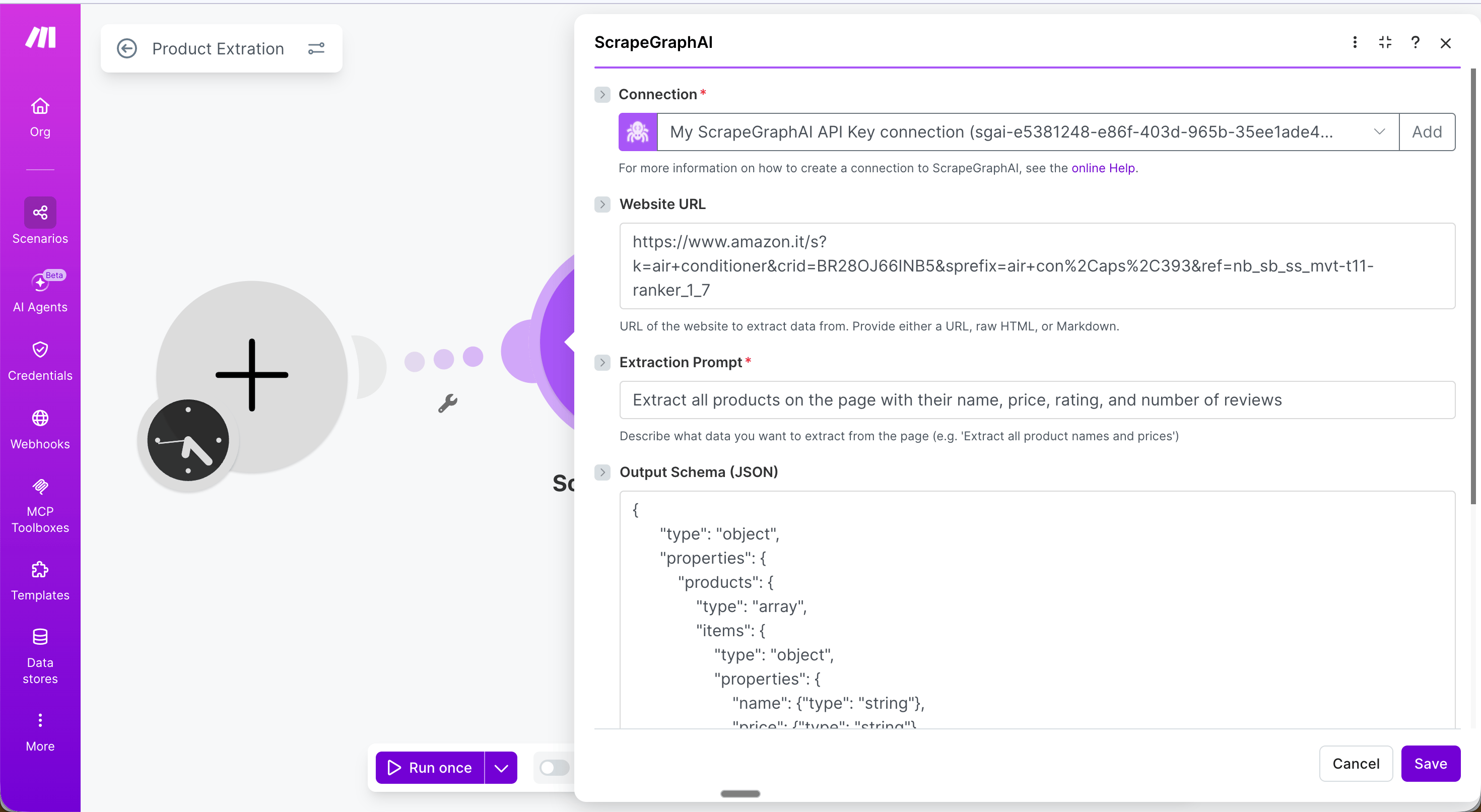 * **URL**: The product listing page to extract from
* **Extraction Prompt**: `Extract all products on the page with their name, price, rating, and number of reviews`
* **Output Schema (JSON)**:
```json theme={null}
{
"type": "object",
"properties": {
"products": {
"type": "array",
"items": {
"type": "object",
"properties": {
"name": {"type": "string"},
"price": {"type": "string"},
"rating": {"type": "number"},
"reviews": {"type": "number"}
}
}
}
}
}
```
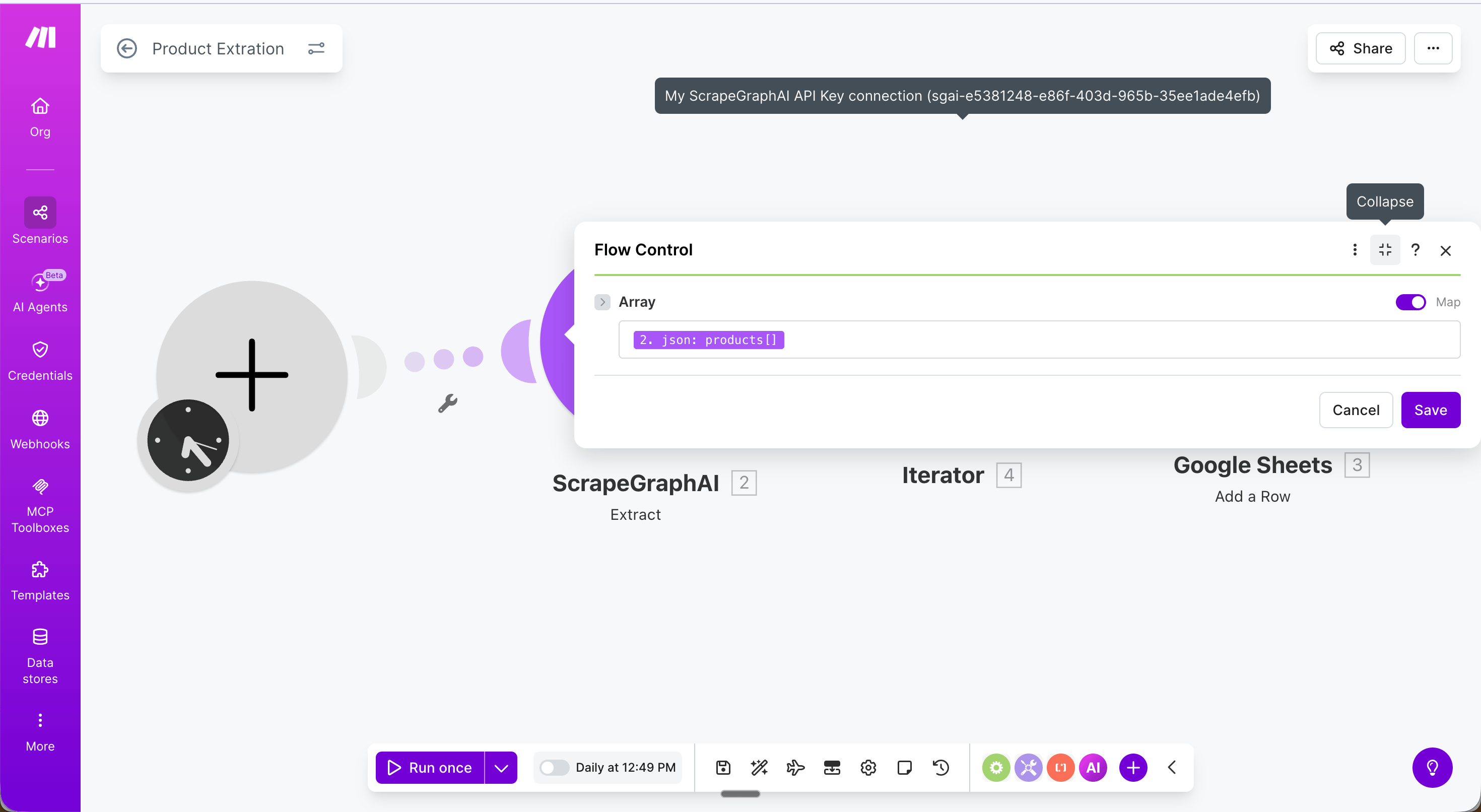
**Step 3 — Iterator**: Add a **Flow Control → Iterator** module and set the **Array** field to `{{2.json.products}}`. This loops through each product and passes it to the next module one at a time.
* **URL**: The product listing page to extract from
* **Extraction Prompt**: `Extract all products on the page with their name, price, rating, and number of reviews`
* **Output Schema (JSON)**:
```json theme={null}
{
"type": "object",
"properties": {
"products": {
"type": "array",
"items": {
"type": "object",
"properties": {
"name": {"type": "string"},
"price": {"type": "string"},
"rating": {"type": "number"},
"reviews": {"type": "number"}
}
}
}
}
}
```
**Step 3 — Iterator**: Add a **Flow Control → Iterator** module and set the **Array** field to `{{2.json.products}}`. This loops through each product and passes it to the next module one at a time.
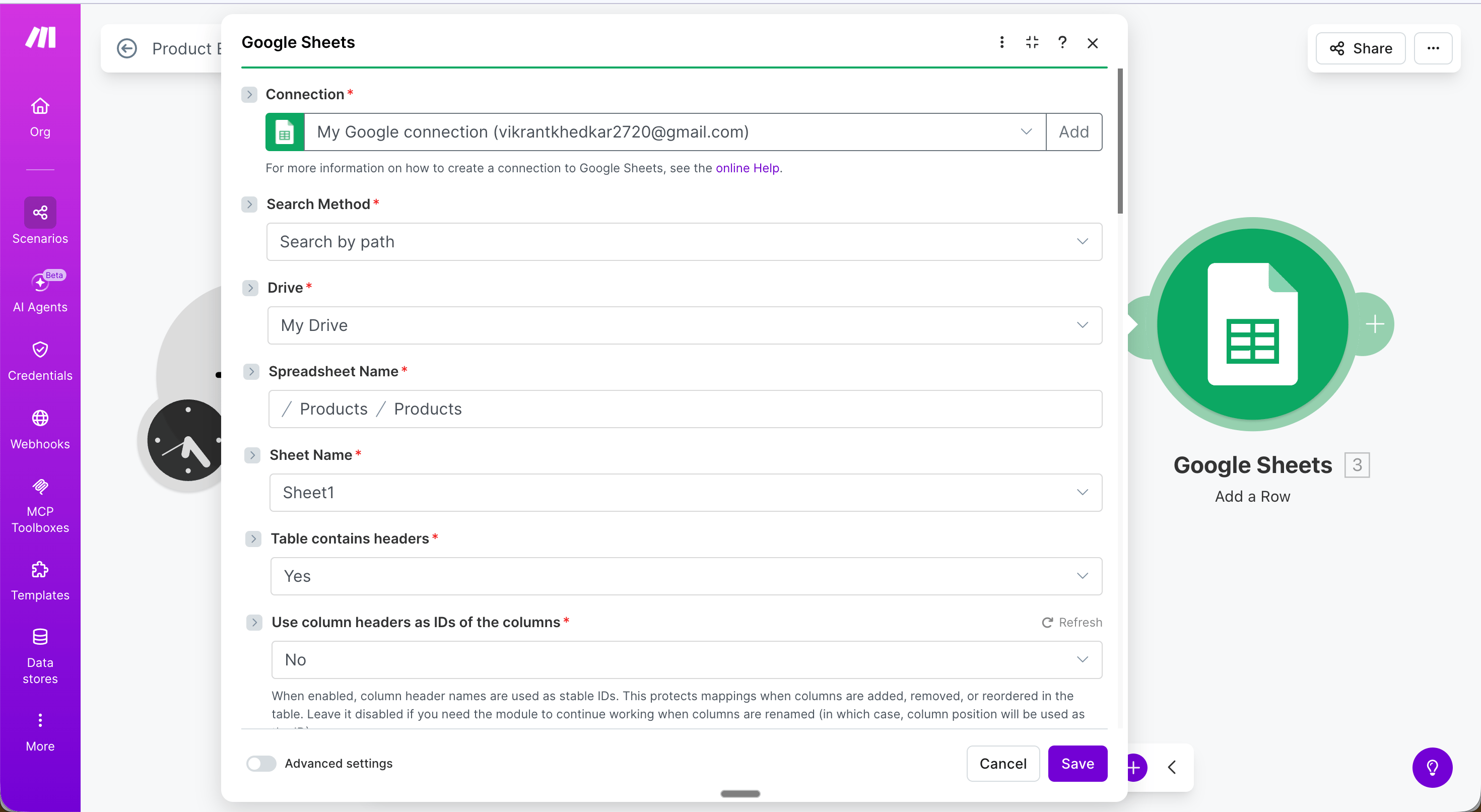
 **Step 4 — Google Sheets: Add a Row**: Map each field from the Iterator output:
* **Name** → `{{value.name}}`
* **Price** → `{{value.price}}`
* **Rating** → `{{value.rating}}`
* **Reviews** → `{{value.reviews}}`
**Step 4 — Google Sheets: Add a Row**: Map each field from the Iterator output:
* **Name** → `{{value.name}}`
* **Price** → `{{value.price}}`
* **Rating** → `{{value.rating}}`
* **Reviews** → `{{value.reviews}}`
 **Result**: Every product on the page is saved as a separate row.
 ***
## Modules
### Scrape a URL
Fetch a URL and return its content in one or more formats: Markdown, HTML, links, images, a plain-text summary, or branding elements.
***
## Modules
### Scrape a URL
Fetch a URL and return its content in one or more formats: Markdown, HTML, links, images, a plain-text summary, or branding elements.
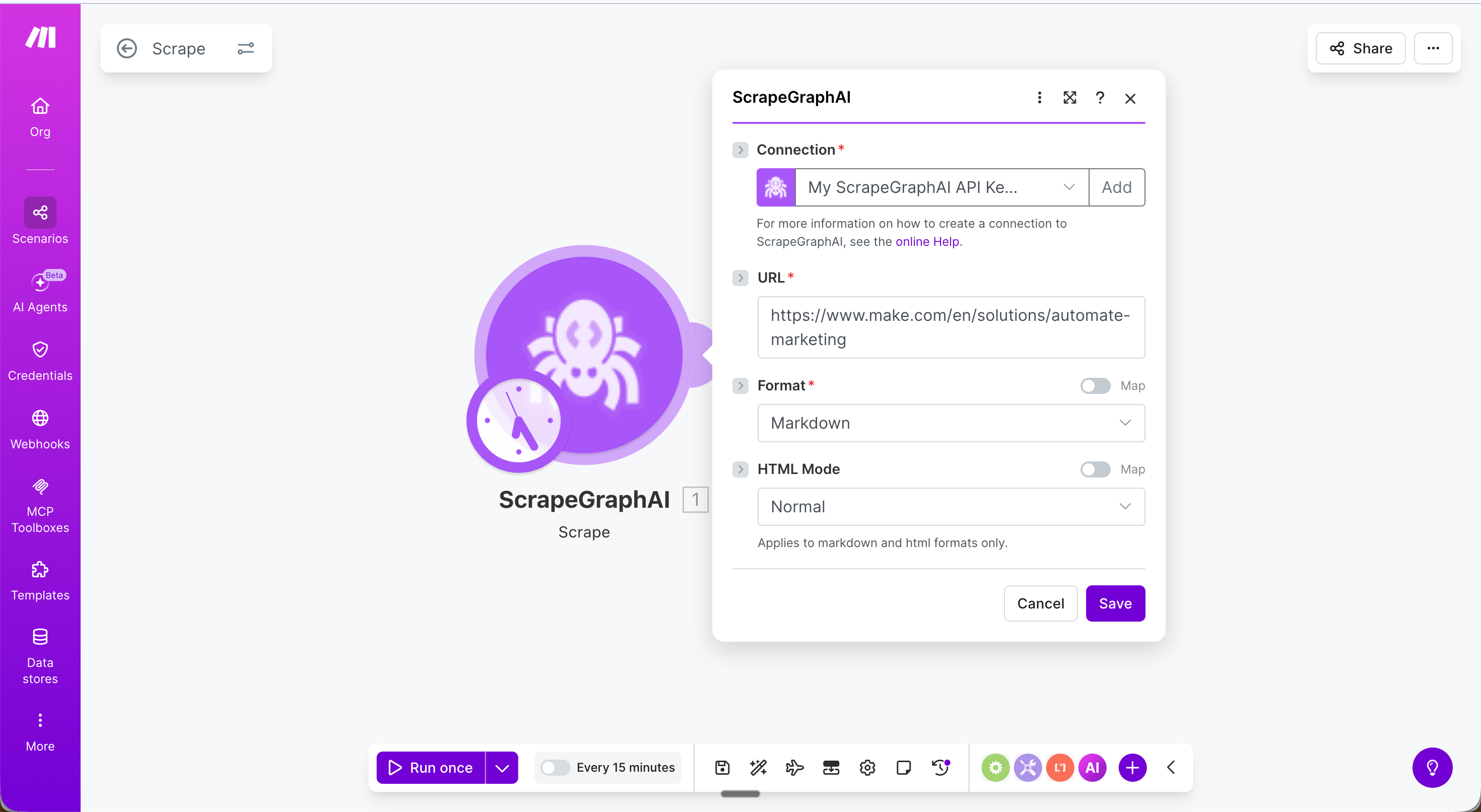 | Field | Description |
| - | - |
| URL | The page to fetch |
| Format | Output format — Markdown, HTML, Links, Images, Summary, Branding |
| HTML Mode | Rendering mode — Normal, Reader, Prune (markdown / HTML formats) |
| JSON Prompt | Natural-language description of what to extract (JSON format only) |
| JSON Schema | Optional JSON Schema string to enforce output shape (JSON format only) |
| Full Page / Width / Height / Quality | Screenshot tuning (Screenshot format only) |
| Content Type | Optional override — Auto, HTML, or PDF |
| Fetch Config | Optional fetch options — see [Fetch Config](#fetch-config) |
***
### Extract data from URL
Send a URL, raw HTML, or markdown to ScrapeGraph and get back structured JSON — driven by a natural-language prompt and an optional JSON schema.
| Field | Description |
| - | - |
| Source Type | `URL`, `Raw HTML`, or `Markdown` — picks which input field is used |
| URL / HTML / Markdown | The content to extract from (one is shown based on Source Type) |
| Extraction Prompt | Natural-language instruction, e.g. `Extract product name and price` |
| Output Schema (JSON) | Optional JSON schema to enforce output shape |
| HTML Processing Mode | Normal, Reader, or Prune |
| Fetch Config | Optional fetch options — see [Fetch Config](#fetch-config). Only applies when Source Type = URL. |
***
### Search web
Run a web search and get page content returned inline — optionally with AI extraction applied to each result.
| Field | Description |
| - | - |
| URL | The page to fetch |
| Format | Output format — Markdown, HTML, Links, Images, Summary, Branding |
| HTML Mode | Rendering mode — Normal, Reader, Prune (markdown / HTML formats) |
| JSON Prompt | Natural-language description of what to extract (JSON format only) |
| JSON Schema | Optional JSON Schema string to enforce output shape (JSON format only) |
| Full Page / Width / Height / Quality | Screenshot tuning (Screenshot format only) |
| Content Type | Optional override — Auto, HTML, or PDF |
| Fetch Config | Optional fetch options — see [Fetch Config](#fetch-config) |
***
### Extract data from URL
Send a URL, raw HTML, or markdown to ScrapeGraph and get back structured JSON — driven by a natural-language prompt and an optional JSON schema.
| Field | Description |
| - | - |
| Source Type | `URL`, `Raw HTML`, or `Markdown` — picks which input field is used |
| URL / HTML / Markdown | The content to extract from (one is shown based on Source Type) |
| Extraction Prompt | Natural-language instruction, e.g. `Extract product name and price` |
| Output Schema (JSON) | Optional JSON schema to enforce output shape |
| HTML Processing Mode | Normal, Reader, or Prune |
| Fetch Config | Optional fetch options — see [Fetch Config](#fetch-config). Only applies when Source Type = URL. |
***
### Search web
Run a web search and get page content returned inline — optionally with AI extraction applied to each result.
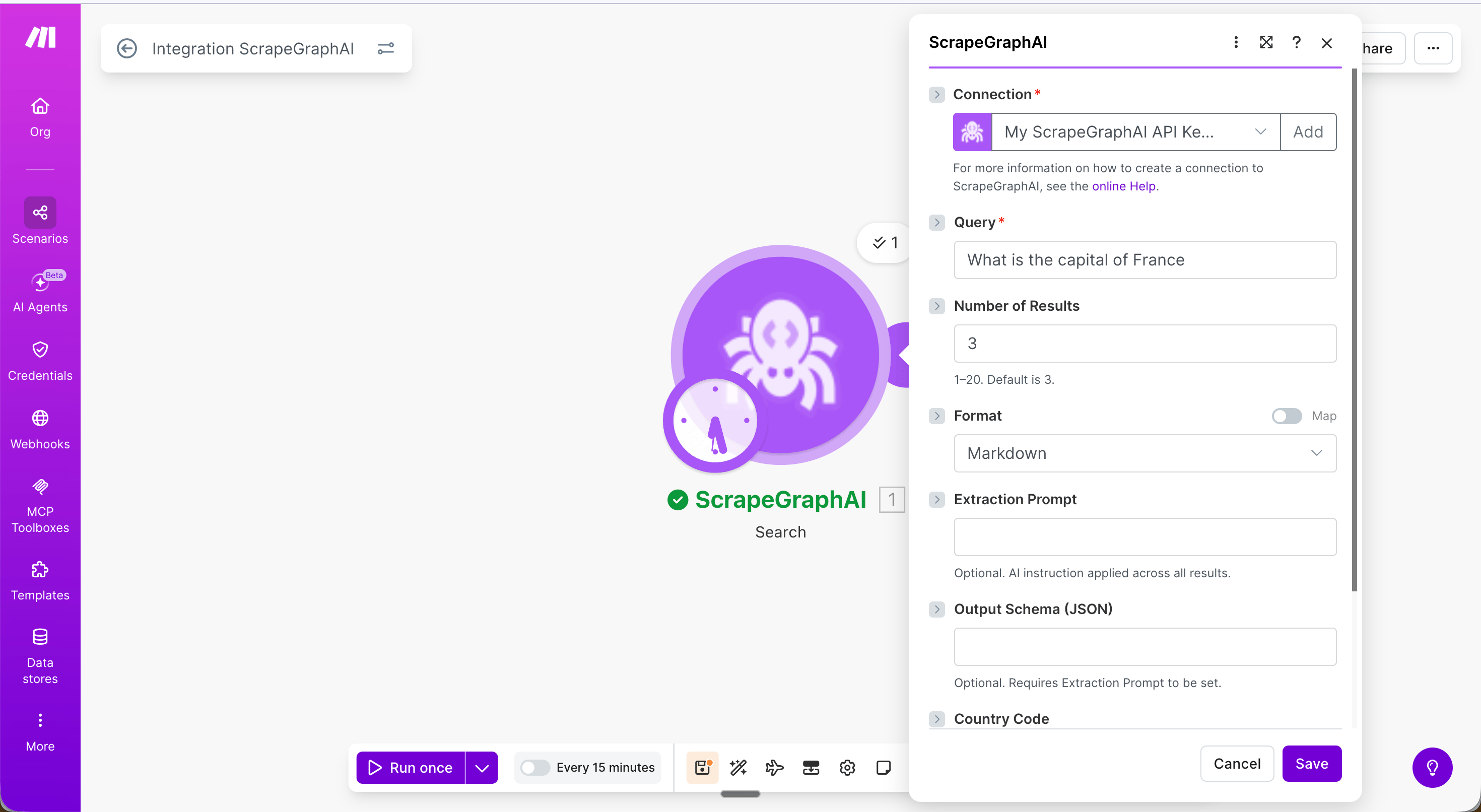 | Field | Description |
| - | - |
| Query | Search query string |
| Number of Results | 1–20, default 3 |
| Format | Content format for each result |
| Extraction Prompt | Optional AI extraction applied to each page |
| Output Schema (JSON) | Optional schema — requires Extraction Prompt |
| Country Code | Curated dropdown of 52 country codes for localised results (US, UK, Germany, Japan, India, …) |
| Fetch Config | Optional fetch options — see [Fetch Config](#fetch-config) |
***
### Crawl a website
Start a multi-page crawl from an entry URL. The module polls internally and returns the **completed** crawl in a single bundle — a `pages` array with one entry per crawled page, each carrying a `scrapeRefId` you can pass to **Get a past result** to fetch its full content.
| Field | Description |
| - | - |
| Query | Search query string |
| Number of Results | 1–20, default 3 |
| Format | Content format for each result |
| Extraction Prompt | Optional AI extraction applied to each page |
| Output Schema (JSON) | Optional schema — requires Extraction Prompt |
| Country Code | Curated dropdown of 52 country codes for localised results (US, UK, Germany, Japan, India, …) |
| Fetch Config | Optional fetch options — see [Fetch Config](#fetch-config) |
***
### Crawl a website
Start a multi-page crawl from an entry URL. The module polls internally and returns the **completed** crawl in a single bundle — a `pages` array with one entry per crawled page, each carrying a `scrapeRefId` you can pass to **Get a past result** to fetch its full content.
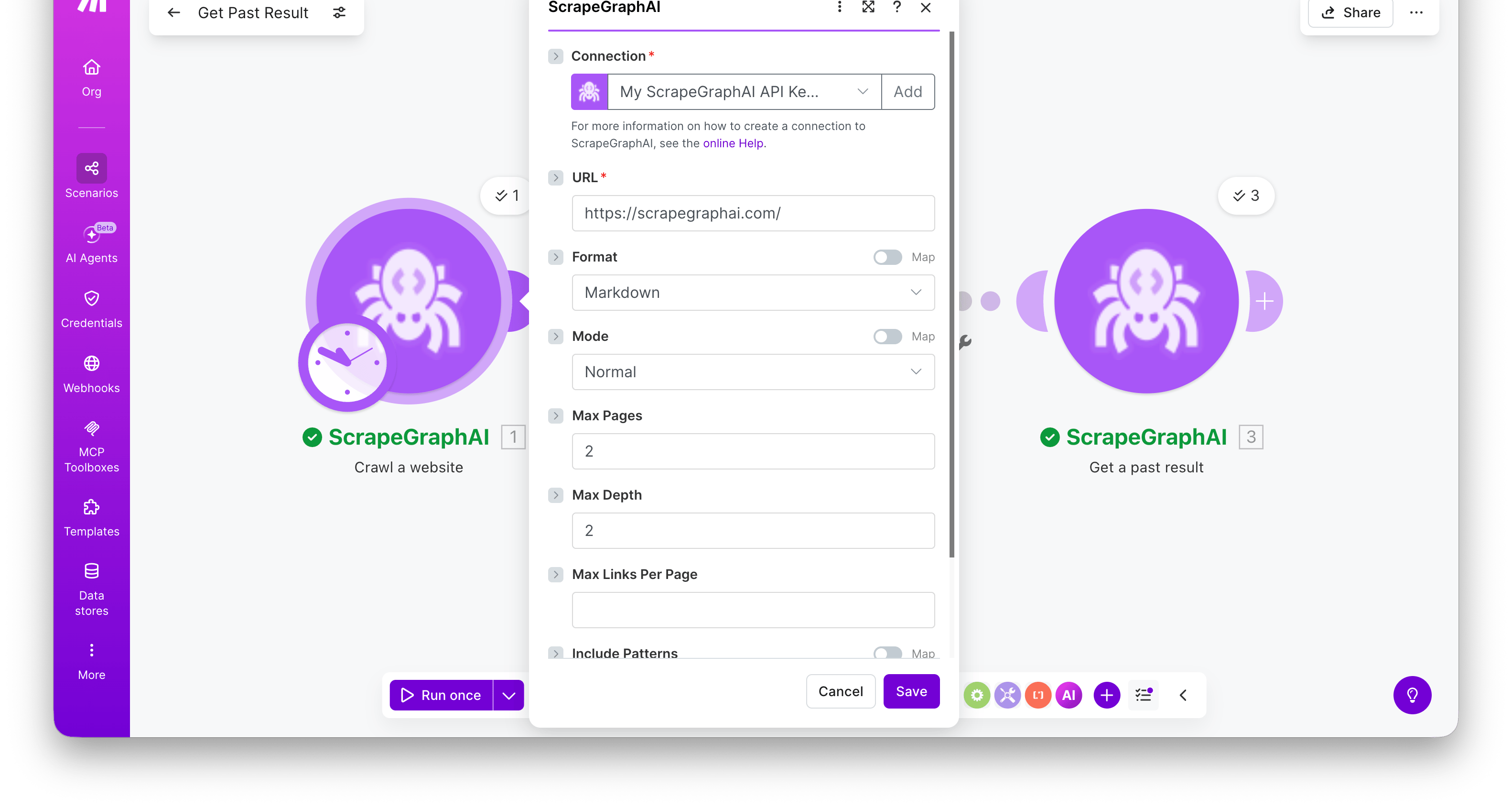 | Field | Description |
| - | - |
| URL | Entry point for the crawl |
| Format | Output format per page (markdown / HTML / JSON / screenshot / links / images / summary / branding) |
| HTML Mode / JSON Prompt / Screenshot dimensions | Format-specific sub-fields, surface based on the chosen Format |
| Max Pages | Cap on total pages crawled (1–1000). Default `50`. |
| Max Depth | How many link levels deep to traverse. Default `2`. |
| Max Links Per Page | Maximum links to follow per page. Default `10`. |
| Allow External Links | Whether to follow links to other domains. Off by default — same-origin only. |
| Include / Exclude Patterns | URL glob patterns, e.g. `/blog/*` |
| Content Types | Optional MIME-type filter (HTML, PDF, Word, Excel, …). Leave empty for all. |
| Fetch Config | Optional fetch options — see [Fetch Config](#fetch-config) |
**Output:**
| Field | Description |
| - | - |
| URL | Entry point for the crawl |
| Format | Output format per page (markdown / HTML / JSON / screenshot / links / images / summary / branding) |
| HTML Mode / JSON Prompt / Screenshot dimensions | Format-specific sub-fields, surface based on the chosen Format |
| Max Pages | Cap on total pages crawled (1–1000). Default `50`. |
| Max Depth | How many link levels deep to traverse. Default `2`. |
| Max Links Per Page | Maximum links to follow per page. Default `10`. |
| Allow External Links | Whether to follow links to other domains. Off by default — same-origin only. |
| Include / Exclude Patterns | URL glob patterns, e.g. `/blog/*` |
| Content Types | Optional MIME-type filter (HTML, PDF, Word, Excel, …). Leave empty for all. |
| Fetch Config | Optional fetch options — see [Fetch Config](#fetch-config) |
**Output:**
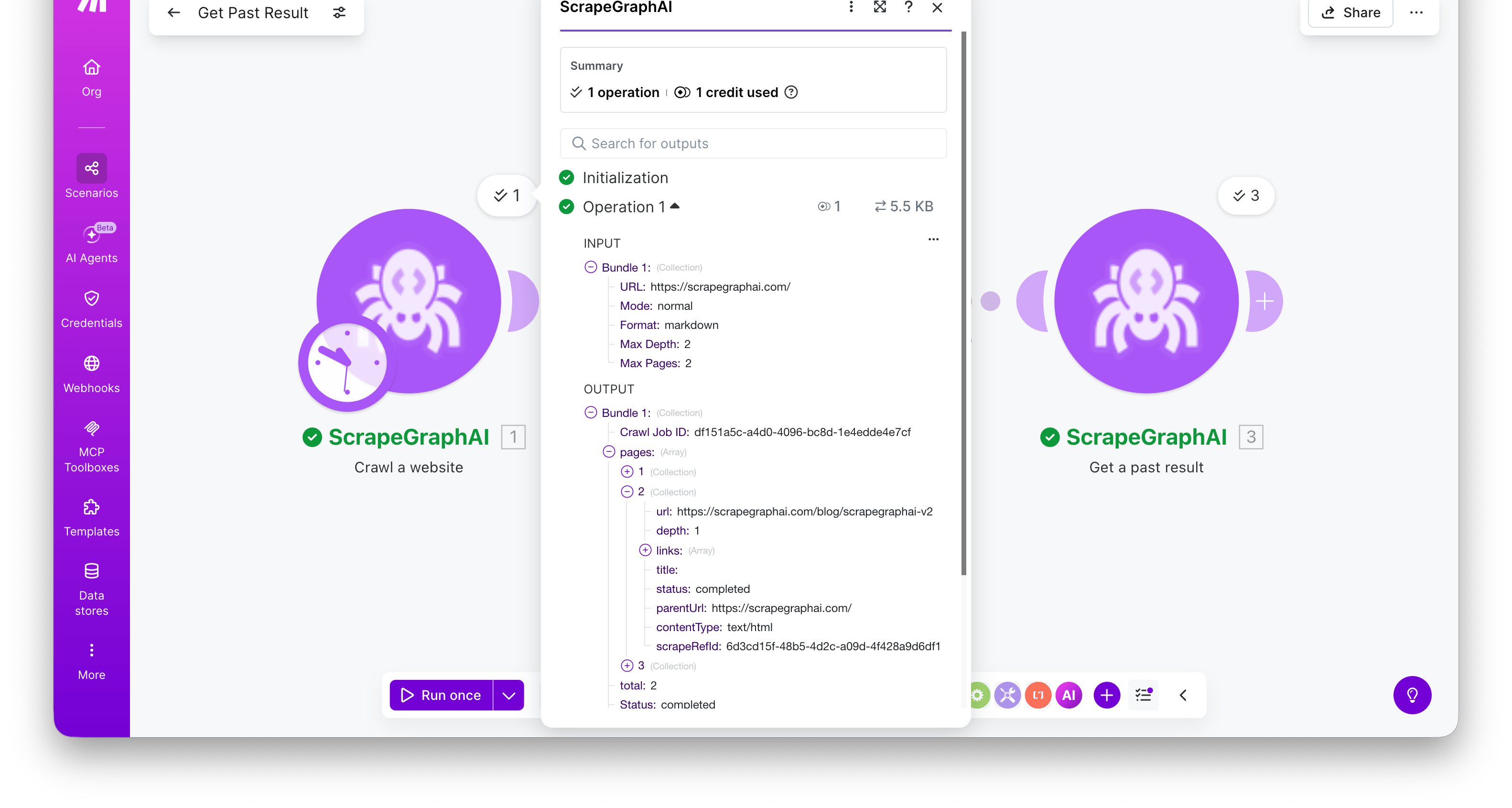 The bundle includes the `Crawl Job ID`, a `Status` of `completed`, and a `pages[]` array. Each page has `url`, `depth`, `title`, `contentType`, `status`, and `scrapeRefId`.
Crawls can take a while on large sites. The module waits for completion before emitting its bundle — for very large crawls (hundreds of pages), increase your scenario's execution timeout in **Scenario settings**.
***
### Create monitor
Schedule ScrapeGraph to fetch a URL on a recurring cron schedule and detect changes between runs.
The bundle includes the `Crawl Job ID`, a `Status` of `completed`, and a `pages[]` array. Each page has `url`, `depth`, `title`, `contentType`, `status`, and `scrapeRefId`.
Crawls can take a while on large sites. The module waits for completion before emitting its bundle — for very large crawls (hundreds of pages), increase your scenario's execution timeout in **Scenario settings**.
***
### Create monitor
Schedule ScrapeGraph to fetch a URL on a recurring cron schedule and detect changes between runs.
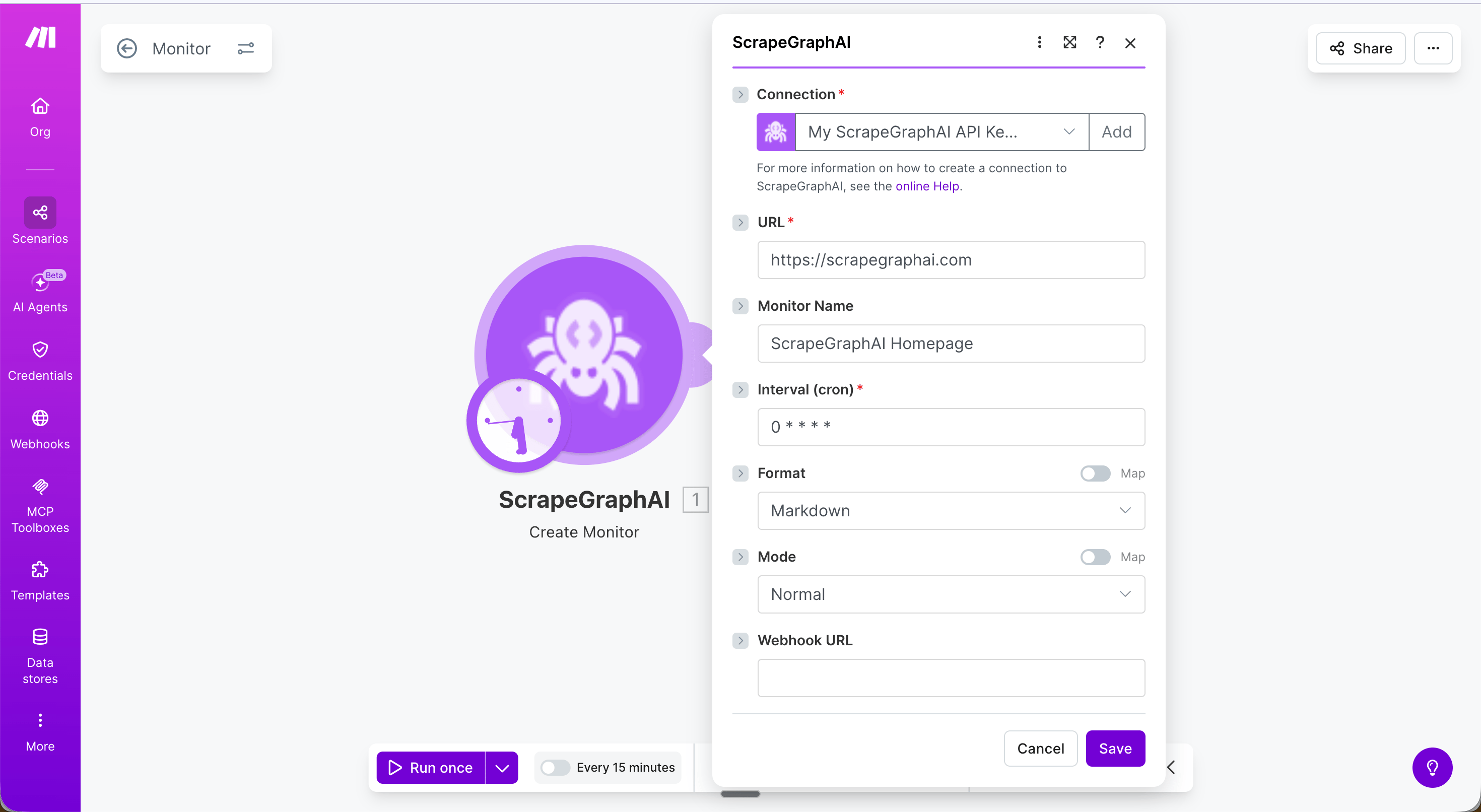 | Field | Description |
| - | - |
| URL | Page to watch |
| Monitor Name | Optional display name |
| Interval (cron) | Cron expression — see table below |
| Format | Content format to capture (markdown / HTML / JSON / screenshot / links / summary) |
| HTML Mode / JSON Prompt / Screenshot dimensions | Format-specific sub-fields, surface based on the chosen Format |
| Webhook URL | Optional URL to POST results to on each tick |
| Fetch Config | Optional fetch options — see [Fetch Config](#fetch-config) |
**Common cron expressions**
| Schedule | Cron |
| - | - |
| Every hour | `0 * * * *` |
| Every 6 hours | `0 */6 * * *` |
| Daily at 09:00 UTC | `0 9 * * *` |
| Weekly on Monday | `0 9 * * 1` |
Run Create monitor once manually to set up the monitor, then use Get monitor activity in a separate scheduled scenario to fetch what changed.
***
### Get monitor activity
Fetch the latest activity ticks from an existing monitor.
| Field | Description |
| - | - |
| URL | Page to watch |
| Monitor Name | Optional display name |
| Interval (cron) | Cron expression — see table below |
| Format | Content format to capture (markdown / HTML / JSON / screenshot / links / summary) |
| HTML Mode / JSON Prompt / Screenshot dimensions | Format-specific sub-fields, surface based on the chosen Format |
| Webhook URL | Optional URL to POST results to on each tick |
| Fetch Config | Optional fetch options — see [Fetch Config](#fetch-config) |
**Common cron expressions**
| Schedule | Cron |
| - | - |
| Every hour | `0 * * * *` |
| Every 6 hours | `0 */6 * * *` |
| Daily at 09:00 UTC | `0 9 * * *` |
| Weekly on Monday | `0 9 * * 1` |
Run Create monitor once manually to set up the monitor, then use Get monitor activity in a separate scheduled scenario to fetch what changed.
***
### Get monitor activity
Fetch the latest activity ticks from an existing monitor.
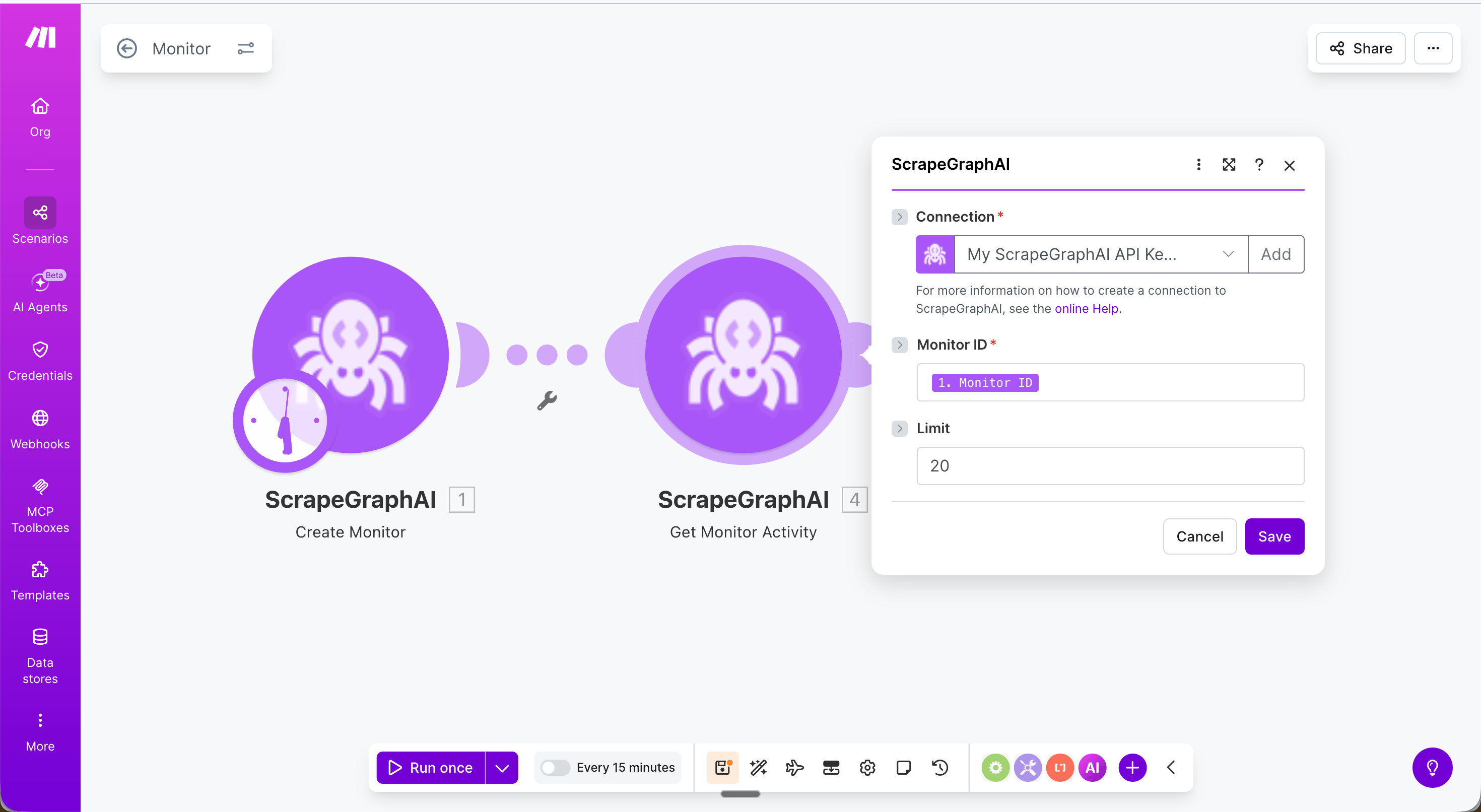 | Field | Description |
| - | - |
| Monitor ID | The `id` returned by Create monitor |
| Limit | Number of ticks to return (1–100, default 20) |
Returns a `ticks` array where each entry has `changed` (boolean), `diffs`, `status`, and `createdAt`.
***
### Update monitor
Edit an existing monitor's interval, format, webhook, or fetch config without deleting and recreating it.
| Field | Description |
| - | - |
| Monitor ID | The `id` returned by Create monitor |
| Limit | Number of ticks to return (1–100, default 20) |
Returns a `ticks` array where each entry has `changed` (boolean), `diffs`, `status`, and `createdAt`.
***
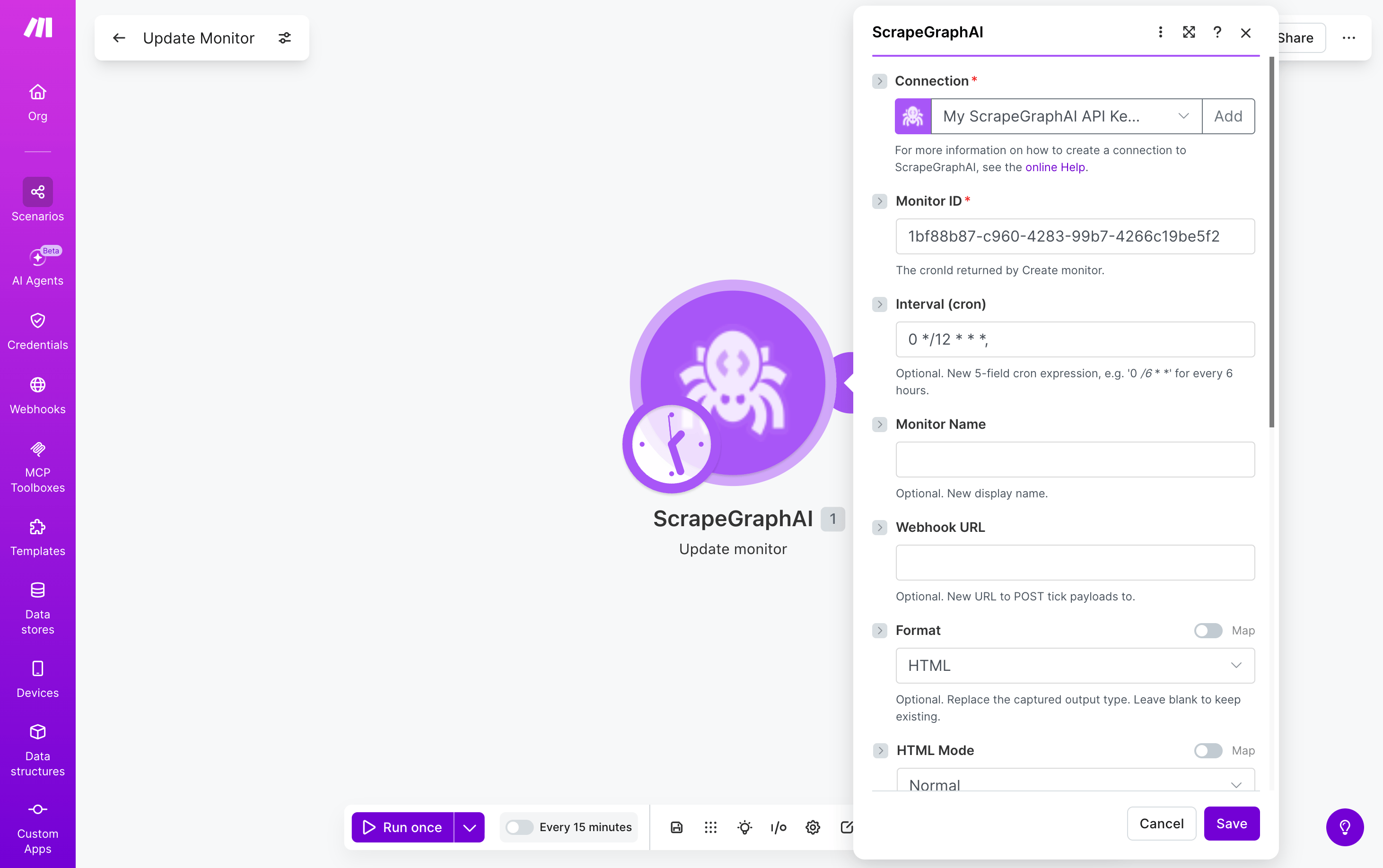
### Update monitor
Edit an existing monitor's interval, format, webhook, or fetch config without deleting and recreating it.
 | Field | Description |
| - | - |
| Monitor ID | The `cronId` returned by Create monitor |
| Interval (cron) | Optional. New 5-field cron expression |
| Monitor Name | Optional. New display name |
| Webhook URL | Optional. New URL to POST tick payloads to |
| Format | Optional. Replace the captured output type — same options and sub-fields as Create monitor |
| Fetch Config | Optional. Replace fetch options — see [Fetch Config](#fetch-config) |
Any field left blank is left unchanged on the monitor. Returns the updated monitor record.
***
### Get a past result
Fetch a stored job result by its ID. Most useful for retrieving the full content of a crawled page using the `scrapeRefId` from **Crawl a website**.
| Field | Description |
| - | - |
| Monitor ID | The `cronId` returned by Create monitor |
| Interval (cron) | Optional. New 5-field cron expression |
| Monitor Name | Optional. New display name |
| Webhook URL | Optional. New URL to POST tick payloads to |
| Format | Optional. Replace the captured output type — same options and sub-fields as Create monitor |
| Fetch Config | Optional. Replace fetch options — see [Fetch Config](#fetch-config) |
Any field left blank is left unchanged on the monitor. Returns the updated monitor record.
***
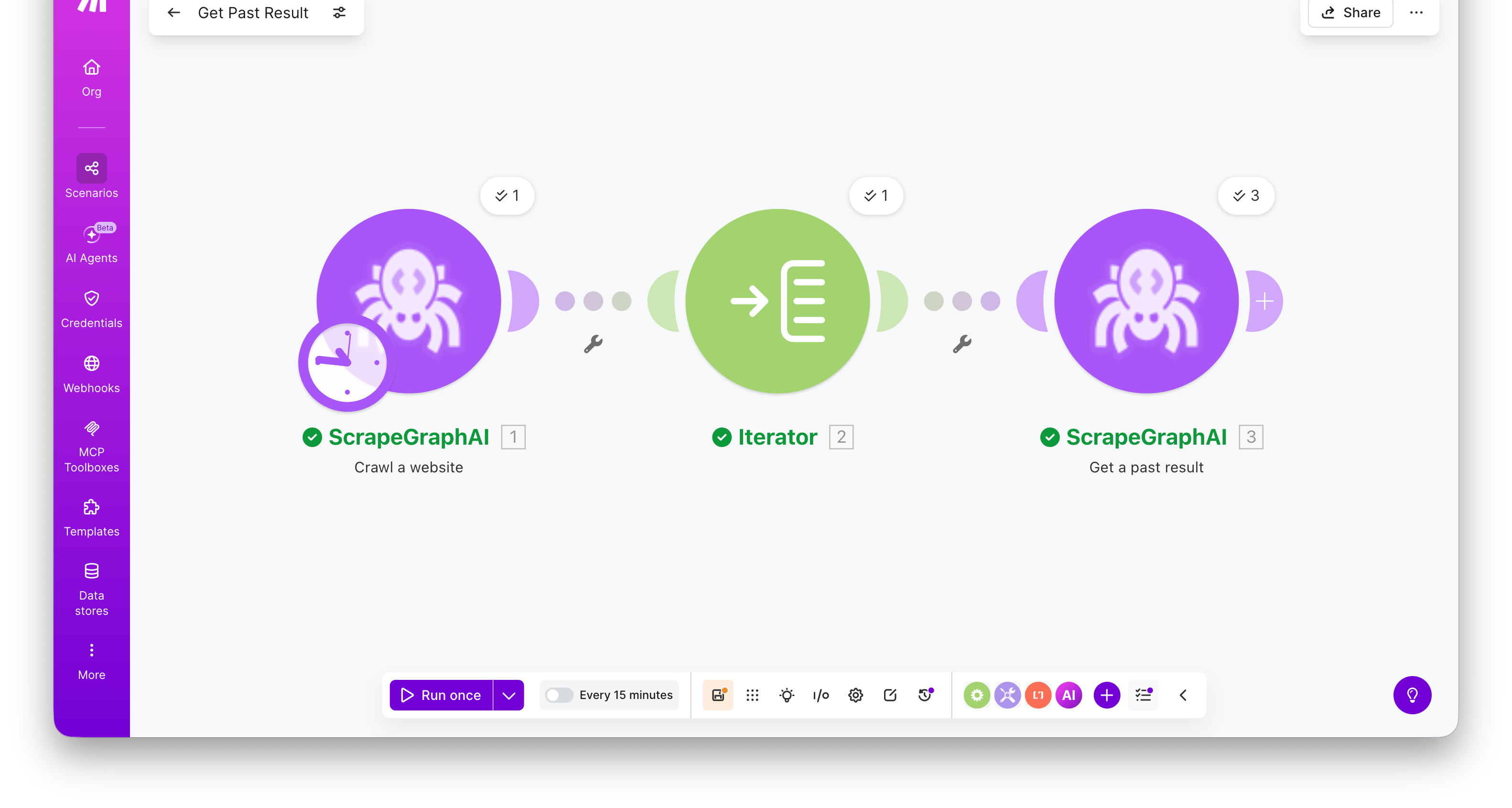
### Get a past result
Fetch a stored job result by its ID. Most useful for retrieving the full content of a crawled page using the `scrapeRefId` from **Crawl a website**.
 | Field | Description |
| - | - |
| Entry ID | A job ID or `scrapeRefId` from a crawl page |
Returns the full stored entry — `result` (the original response payload), `metadata` (content type and other run details), `params` (the inputs the job was run with), `service`, `status`, and `createdAt`.
Combine **Crawl a website → Iterator → Get a past result** to crawl a site and retrieve the full markdown / HTML / extracted JSON for every page in one scenario. Map the iterator's `scrapeRefId` into the Entry ID field — the module runs once per crawled page.
***
### List past results
Browse recent ScrapeGraphAI jobs filtered by service type. Search-style module — emits one bundle per entry, ready to fan out into downstream modules.
| Field | Description |
| - | - |
| Entry ID | A job ID or `scrapeRefId` from a crawl page |
Returns the full stored entry — `result` (the original response payload), `metadata` (content type and other run details), `params` (the inputs the job was run with), `service`, `status`, and `createdAt`.
Combine **Crawl a website → Iterator → Get a past result** to crawl a site and retrieve the full markdown / HTML / extracted JSON for every page in one scenario. Map the iterator's `scrapeRefId` into the Entry ID field — the module runs once per crawled page.
***
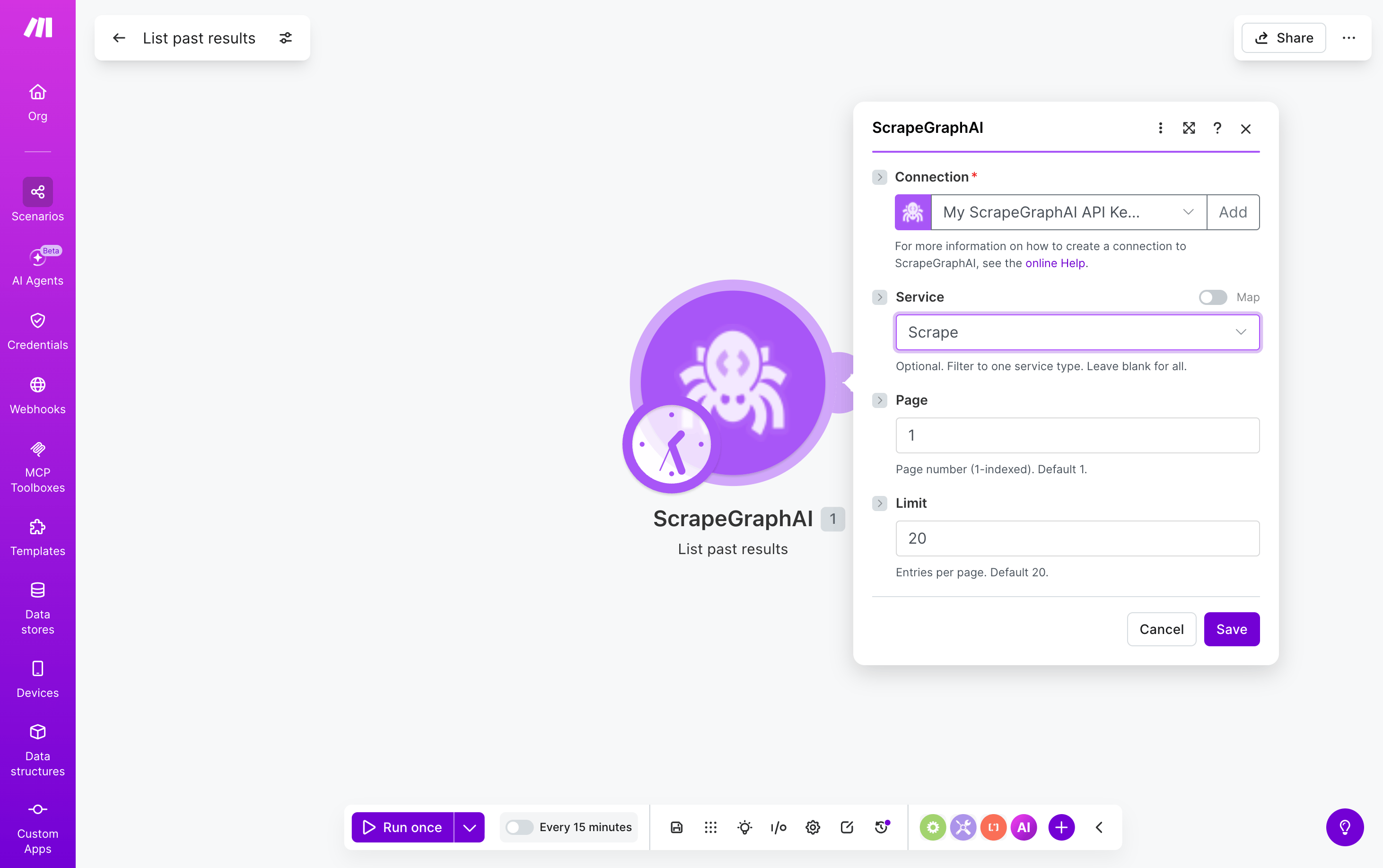
### List past results
Browse recent ScrapeGraphAI jobs filtered by service type. Search-style module — emits one bundle per entry, ready to fan out into downstream modules.
 | Field | Description |
| - | - |
| Service | Optional. Filter to one service: `Scrape`, `Extract`, `Search`, `Crawl`, `Monitor`, `Schema`. Leave blank for all. |
| Page | Page number, 1-indexed (default `1`) |
| Limit | Entries per page, 1–100 (default `20`) |
Each emitted bundle has `id`, `service`, `status`, `url`, `createdAt`, and other run metadata. Pipe a bundle's `id` into **Get a past result** to retrieve the full stored payload.
***
## Fetch Config
Five modules — **Scrape a URL**, **Extract data from URL**, **Search web**, **Crawl a website**, and **Create monitor** — accept an optional **Fetch Config** collection that controls how each page is fetched. Leave it empty to use defaults.
| Field | Description |
| - | - |
| Service | Optional. Filter to one service: `Scrape`, `Extract`, `Search`, `Crawl`, `Monitor`, `Schema`. Leave blank for all. |
| Page | Page number, 1-indexed (default `1`) |
| Limit | Entries per page, 1–100 (default `20`) |
Each emitted bundle has `id`, `service`, `status`, `url`, `createdAt`, and other run metadata. Pipe a bundle's `id` into **Get a past result** to retrieve the full stored payload.
***
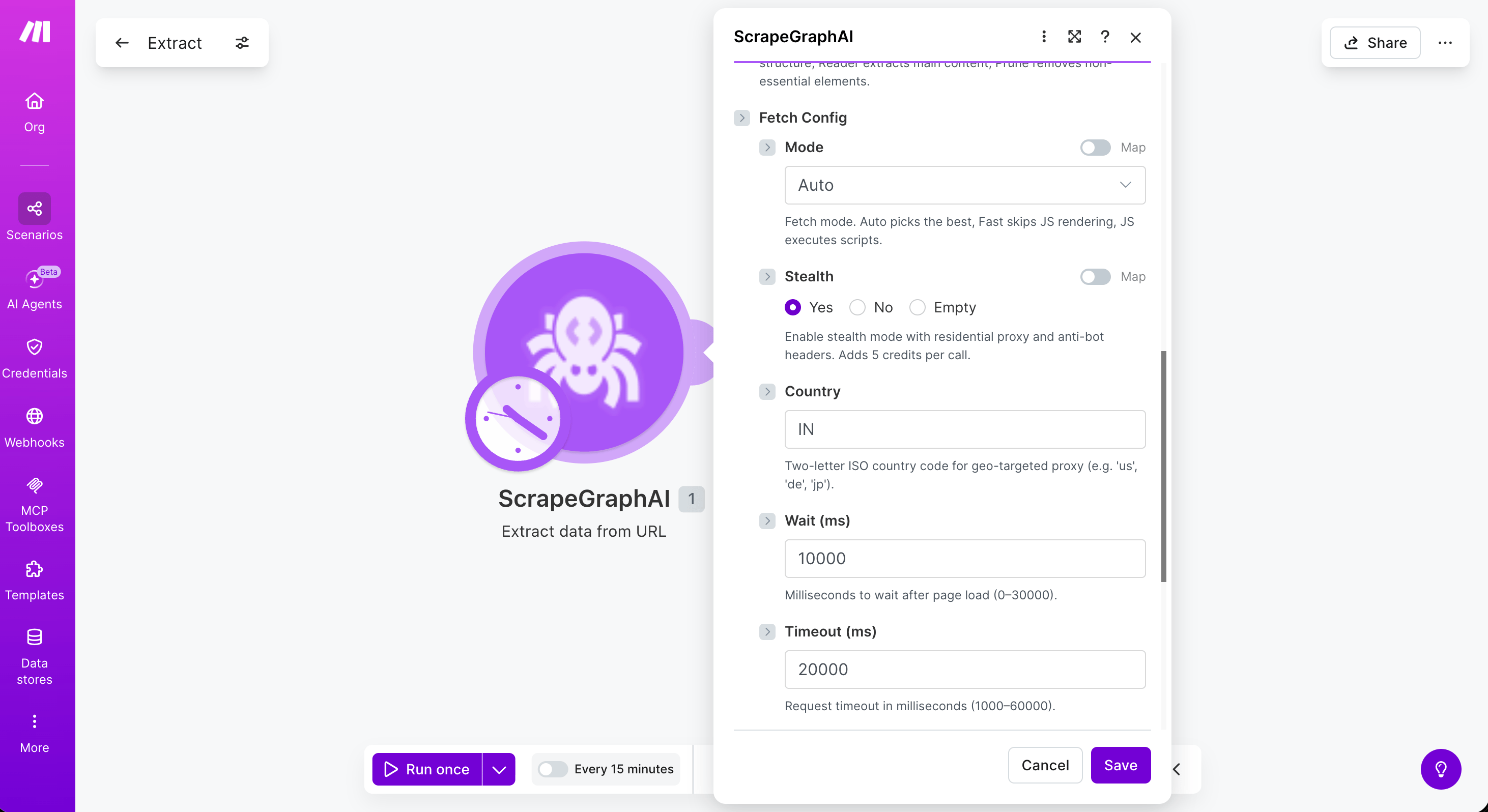
## Fetch Config
Five modules — **Scrape a URL**, **Extract data from URL**, **Search web**, **Crawl a website**, and **Create monitor** — accept an optional **Fetch Config** collection that controls how each page is fetched. Leave it empty to use defaults.
 | Field | Description |
| - | - |
| Mode | Fetch mode — `Auto` (default), `Fast` (skips JS rendering), or `JS` (executes scripts) |
| Stealth | Residential proxy + anti-bot headers. **Adds 5 credits per call** |
| Country | Two-letter ISO country code for geo-targeted proxy (e.g. `us`, `de`, `jp`) |
| Wait (ms) | Milliseconds to wait after page load (0–30000) |
| Timeout (ms) | Request timeout in milliseconds (1000–60000) |
| Scrolls | Number of page scrolls to trigger lazy-loaded content (0–100) |
| Headers (JSON) | Custom HTTP headers as a JSON object string, e.g. `{"User-Agent": "..."}` |
| Cookies (JSON) | Cookies as a JSON object string, e.g. `{"session": "abc123"}` |
Reach for **Stealth** + **Mode = JS** + **Wait = 2000–5000** when a site blocks bots or only renders content after JavaScript runs. Combine with **Country** to bypass region-locked pages.
***
## Deprecated modules
The following modules from the v1 integration are still visible but no longer functional. Use the v2 modules above instead.
| Deprecated | Replacement |
| - | - |
| \[Deprecated] SmartScrape | Scrape |
| \[Deprecated] Markdownify | Scrape (Markdown format) |
| \[Deprecated] Generate JSON Schema | Extract |
This documentation is built and hosted on [Mintlify](https://mintlify.com), a developer documentation platform.
| Field | Description |
| - | - |
| Mode | Fetch mode — `Auto` (default), `Fast` (skips JS rendering), or `JS` (executes scripts) |
| Stealth | Residential proxy + anti-bot headers. **Adds 5 credits per call** |
| Country | Two-letter ISO country code for geo-targeted proxy (e.g. `us`, `de`, `jp`) |
| Wait (ms) | Milliseconds to wait after page load (0–30000) |
| Timeout (ms) | Request timeout in milliseconds (1000–60000) |
| Scrolls | Number of page scrolls to trigger lazy-loaded content (0–100) |
| Headers (JSON) | Custom HTTP headers as a JSON object string, e.g. `{"User-Agent": "..."}` |
| Cookies (JSON) | Cookies as a JSON object string, e.g. `{"session": "abc123"}` |
Reach for **Stealth** + **Mode = JS** + **Wait = 2000–5000** when a site blocks bots or only renders content after JavaScript runs. Combine with **Country** to bypass region-locked pages.
***
## Deprecated modules
The following modules from the v1 integration are still visible but no longer functional. Use the v2 modules above instead.
| Deprecated | Replacement |
| - | - |
| \[Deprecated] SmartScrape | Scrape |
| \[Deprecated] Markdownify | Scrape (Markdown format) |
| \[Deprecated] Generate JSON Schema | Extract |
This documentation is built and hosted on [Mintlify](https://mintlify.com), a developer documentation platform.